BDG
General approach
The Board Description Generator (BDG) is a tool which allows to generate description files for boards. For doing so, a picture of the board is needed which will serve as reference image for the BSP.
The picture should meet the following criteria: well lightning conditions, at least hd resolution, board is fully visible and not too small. Generally, the window is resizable and the content will be scaled accordingly. The radius of the LEDs will be adjusted as well.
Note
Although resizing the windows is possible, the actual image will be saved in the original resolution.
Place board corner points
With the BDG such an image can be loaded and edited. The BDG ca be operated in two modes ‘Place corner point’ or ‘Place LED’. In ‘Place corner point’ mode, corner points can be placed. These corner points are intended to mark the corners of the board in the picture. The region marked will be visible in red.
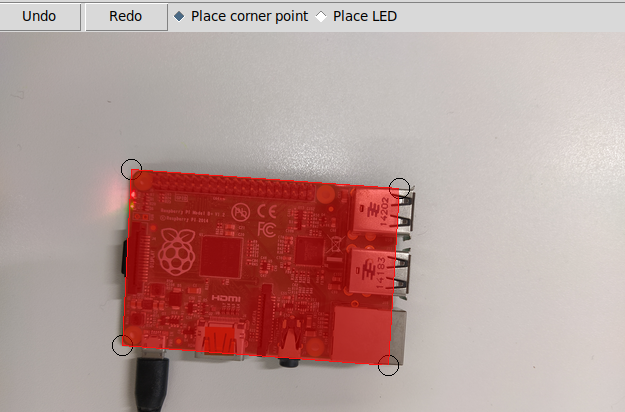
An example where a picture of a raspberry pi is loaded and the corners points have been placed.
The selected area will be used by the BSP to perform a feature detection, so the resolution should be around full hd for better results in the detection.
Additionally, the board id has to be set. The id will be used to publish the changes via Mqtt.
Place LEDs
In the second mode markers for the LEDs can be placed. For each placed LED there is an entry for the unique name or function and checkboxes for the possible colors on the right hand side of the window. The index of the LED is displayed in the list and on the lower left corner of each LED as well. By using the mousewheel the radius of the circles can be adjusted.
The BSP will use these regions to detect the status of the LED.
Warning
The names of the LEDs should be unique because they are used to publish the changes in the mqtt.
Key support
Control + Z / Control + Y: Undo/Redo placement of a corner or LED.
Arrow Keys: Move the last selected circle a pixel in the direction
Mouse Wheel: Increase/Decrease size of a LED
In addition it is possible to resize the window but this will not affect the final coordinates of the corners/leds.
Classes of the BDG
The BDG is implemented with the Model View Controller (MVC) pattern in mind to allow easy maintenance. View is responsible for the UI and displays the data which is saved in the coordinator. The coordinator module has classes which allow to register for events (image change or point change). Thus there is no dependency of the view in the coordinator. Finally, the model provides the Board object which is used in the BSP as well.
This class diagram states the components and their relations.
Following the classes and their members:
Board
The data object which contains the specifications of the board to detect.
- class BDG.model.board_model.Board(name='', author='', img_path='', corners=None, led_objects=None, image=None)
Dataclass for Board Specifications
- add_led(led: BDG.model.board_model.Led, relative_vector=False)
Adds an led object and calculates the relative vector if the given vector is from (0,0)
- Parameters
led – Is an LED object
relative_vector – (bool, optional): True if the vector is from the upper left corner of the BOARD, False if the vector is from the upper left corner of the IMAGE. Defaults to False.
- get_relative_vector(vector: numpy.array)
helper class for calculating relative vector
- Parameters
vector – np.array
- Returns
vector
- set_board_corners(points: List)
Creates corner points and sorted them against clockwise direction
- Parameters
points – (np.array): is an array of points which are a convex polygon
- set_image(image)
Sets pil image
- Parameters
image – (Image): is an PIL image or a str
CreationState
- class BDG.model.CreationState.CreationState(value)
The current placement mode. If it is BOARD, an anchor point is placed on left mouse click, if it is LED a LED is placed.
EventHandler
Contains two lists in the on_update dictionary which represent some sort of publish/subscribe. The ‘on_update_point’ and the ‘on_update_image’ lists contain methods which will be called when the image or the points were updated by user input.
Consequently, the view does only subscribe via writing methods in the lists and updates the UI then when the methods are being called.
In addition, the EventHandler contains the current Board reference and this reference should only be accessed by this EventHandler.
- class BDG.coordinator.event_handler.EventHandler
Contains the other event handler and methods to signal an update of the image or the points.
- update(channel='')
Calls all function which are in the list indicated by ‘channel’ :param channel: The channel to update. Either ‘on_update_point’ or ‘on_update_image’. If nothing, all channels will be updates
- update_board(board: BDG.model.board_model.Board)
Updates the board object in the handler and calls all update methods. :param board: The new board which will be set in self
- update_image()
Calls all functions which are in the list ‘on_update_image’.
- update_points()
Calls all functions which are in the list ‘on_update_point’.
EditHandler
Contains the board corners, the placed LEDs, the scaling, deleted corners or LEDs and the current placement state. Every change of the the corners or LEDs is processed here. The view takes the data from this class as well.
- class BDG.coordinator.edit_handler.EditHandler(parent: EventHandler)
Responsible for edit event of the UI such as creating, deleting, undoing, redoing. The methods which alter the LEDs or corners always call the update points method. Consequently the UI just has to subscribe to the events and update the content accordingly. Realises the Model View Controller pattern.
- add_corner(event)
Adds a corner at the coordinates of the click event
- Parameters
event – The click event with the x and y coordinate
- Returns
None
- add_led(event)
Adds a LED on the coordinates in the click event.
- Parameters
event – The click event with x and y coordinates
- Returns
None
- board() BDG.model.board_model.Board
Returns the current board object
- Returns
Board
- check_hovered(cx, cy)
Helper function for checking the currently hovered anchor point or LED.
- Parameters
cx – The x coordinate to check
cy – The y coordinate to check
- Returns
an np array
- delete_point(event)
Removes the currently hovered point or LED
- Parameters
event – is a Mouse event
- Returns
- is_state(state)
Checks if the CreationState is currently in ‘state’
- Parameters
state – The state to check
- Returns
True, if the CreationState is the passed state
- move_current_led_one_pixel_horizontally(amount: int)
Moves the active led horizontally by the amount
- Parameters
amount – The amount negative means left, positive right
- Returns
- move_current_led_one_pixel_vertically(amount: int)
Moves the active led vertically by the amount
- Parameters
amount – The amount to move, negative means up, positive down
- Returns
- moving_point(event)
Moves the currently selected anchor point or LED
- Parameters
event –
- on_mousewheel(event)
Processes a mousewheel event. Optimised for Windows and Unix events. Does increase/decrease the radius of the active led.
- Parameters
event – The mousewheel event
- redo()
Redoes the last deleted, undone point or LED
- undo()
Undoes the last LED or Point
FileHandler
- class BDG.coordinator.file_handler.FileHandler(parent)
Responsible for saving and loading the svg, json or image file.
- load()
loads either a predifined json file as board or inits a new board with a selected image
- Args:
file_path (str): [description]
- save()
saves the current board either as svg or json
- Args:
file_name (str, optional): [description]. Defaults to “”.
ControlPane
- class BDG.view.ControlPane.ControlPane(container)
ImagePane
- class BDG.view.ImagePane.ImagePane(master, container, handler: BDG.coordinator.edit_handler.EditHandler)
This class contains the drawing functionalities
- Parameters
self.img_path – is a relative path to the image which is loaded
self.master – is the master frame in which this frame is inserted
self.polygon – is a reference for the current polygon
self.polygon_images – is a dict holding the drawn polygons. IMPORTANT: PLEASE DON’T DELETE THIS; OTHERWISE THE IMAGE IS OPTIMISED OUT
self.canvas – is a tkinter canvas object
self.points – are the currently displayed circles
self.active_circle – is a reference as Integer to the currently selected circle
self.anchor_points – are the anchor points for the polygon
- activate_board_state()
Change all bindings to board state settings
- Returns
void
- activate_led_state()
Change all bindings to LED state settings
- Returns
void
- create_circle(position, r)
Helper function for creating circle
- Parameters
position – The coordinates of the circle
r – is the radius
- Returns
a canvas object ref represented as Integer
- create_polygon(*args, **kwargs)
Creates an polygon using either PIL or tk.Canvas-
Because tk.Canvas doesn’t support RGBA, the PIL lib is used to create an tkImage, which is added to the canvas
- Parameters
args – is an even array of coordinates such as [x0, y0, x1, y1, … , xn, yn]
kwargs – are some named arguments which can be read in the ImageDraw Documentation. The fill keyword is required!
- Returns
an canvas element
- delete_circles()
Deletes the corner points bounding circles in the canvas. Used when the CreationState is switched to LED as the circles are then not visible anymore
- draw_corner(point)
Draws a corner at the given coordinates
- Parameters
point – The coordinates to draw
- draw_led(position, radius)
Draws a LED at the given coordinates
- Parameters
position – The coordinates of the new LED
radius – The radius of the new LED
- on_resize(event)
Resizes the image in the canvas to fit the canvas while still having the same proportions.
- Parameters
event –
- update_board()
Sets the board object in self to the board object of the handler.
- update_image()
Reloads the image of the current board object in the canvas. Automatically fits the image to the windows size by invoking a resize event.
- update_led_indices()
Redraws the indices of the LEDs anew.
- update_points()
Removes and creates again all corner points and LEDs
- update_polygon()
Reads the current anchor_points and updates shape of polygon
- Returns
void
Scrollable
- class BDG.view.Scrollable.ScrollbarFrame(parent, edit_handler: BDG.coordinator.edit_handler.EditHandler, **kwargs)
Extends class tk.Frame to support a scrollable Frame This class is independent from the widgets to be scrolled and can be used to replace a standard tk.Frame
- on_configure(event)
Set the scroll region to encompass the scrolled frame
Toolbar
- class BDG.view.Toolbar.Toolbar(master, image_pane: BDG.view.ImagePane.ImagePane, handler: BDG.coordinator.edit_handler.EditHandler)
Responsible for the Radiobuttons which allow to switch between the CreationStates. The Radiobuttons update the tk.IntVar in the EditHandler.
LedDisplay
- class BDG.view.LedDisplay.LedDisplay(parent, index, led: BDG.model.board_model.Led, **kwargs)
A class which contains the widgets to enter the necessary meta information about LEDs. Will be grided into a Scrollable
- update_number(new_number)
Updates the displayed number :param new_number: The new number to display :return:
JsonUtil
Provides functions for encoding and decoding board description models from or to json
UtilFunctions
Utility functions for creating Board Description Model such as Sorting Points
- BDG.utils.util_functions.angle_between(v1, v2)
Returns the angle in radians between vectors ‘v1’ and ‘v2’:
>>> angle_between((1, 0, 0), (0, 1, 0))
1.5707963267948966 >>> angle_between((1, 0, 0), (1, 0, 0)) 0.0 >>> angle_between((1, 0, 0), (-1, 0, 0)) 3.141592653589793
- BDG.utils.util_functions.convert_image_to_data_uri(path: str) str
Reads an image from path and converts it to a data uri scheme as string
- Parameters
path – is a path to an image
- Returns
a binary image as datauri
- BDG.utils.util_functions.decode_img_data(img_attr: str) numpy.array
Decodes the embedded image string.
- Args:
img_attr (str): is the href data
- BDG.utils.util_functions.find_index_closest_point(arr, point)
Returns closest point using the cartesian product
- BDG.utils.util_functions.is_equal(a: numpy.ndarray, b: numpy.ndarray)
Compares two numpy arrays and returns true if the values are equal. this helper function was to avoid Value errors
- Parameters
a – a numpy array
b – a numpy array
- Returns
True -> the arrays are equal, False -> the arrays are differnt
- BDG.utils.util_functions.led_id_generator(name_prefix='led-', suffix=0)
Generator function for creating led ids such as led-1
- Parameters
name_prefix –
suffix –
- Returns
- BDG.utils.util_functions.sort_points(points: numpy.array)
Sorts a given array of vectors clockwise. It is assumed that the spanned polygon is convex
- Parameters
points – is a numpy array of shape n,2 with array[n] = [x_n, y_n].
- Returns
the clockwise sorted array
- BDG.utils.util_functions.split_to_list(array)
converts a 2d numpy array into a python list, where every item is an numpy array Example: input: np.array([[1,1],[2,2]]) output: [np.array([1,1]),np.array([2,2])
- Parameters
np_array – is an 2d numpy array or a 2d list
- Returns
a list containing numpy arrays
- BDG.utils.util_functions.unit_vector(vector)
Returns the unit vector of the vector.