BSP - Board State Provider
The board state provider is the brain of the detector. It is responsible for the localization of the LEDs as well as the detection of their states or state changes.
General approach
Based on the reference image, features are extracted with SIFT and matched with ‘knn nearest’ in the target image. The matching allows to calculate the homography matrix which describes the rotation and scaling difference between the reference and target image. With the difference known, it is possible to calculate relative coordinates from the reference into absolut coordinates in the target image. Consequently, the coordinates of the LEDs can be calculated and regions of interest (ROI) can be extracted.
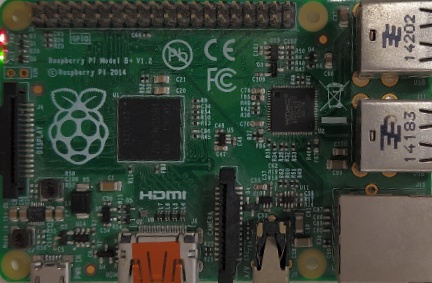
An example for a reference picture of a Raspberry Pi model B+ The image shows the board from above and is cropped to the corner points of the board. Such reference data can be generated with the BDG and is necessary for providing the state of the board in a target image.
State Table
The next step is to detect whether the LEDs shown in the ROIs are powered on or off and in addition if they are on the color can be determined. The so gained information will be saved in the state_table which contains a list of StateEntries:
name |
current_state |
last_time_on |
last_time_off |
hertz |
|---|---|---|---|---|
String |
LEDState |
Timestamp |
Timestamp |
Float |
The frequency saved in the attribute ‘hertz’ will be calculated by the detector when the first change between on and off occurs. Changes of the table will then be forwarded to MQTT.
Lighting conditions
The lighting conditions are important for the detection to work properly. As a rule of thumb one can use the assumption that if the LEDs light is overlapping wrong detection is possible.
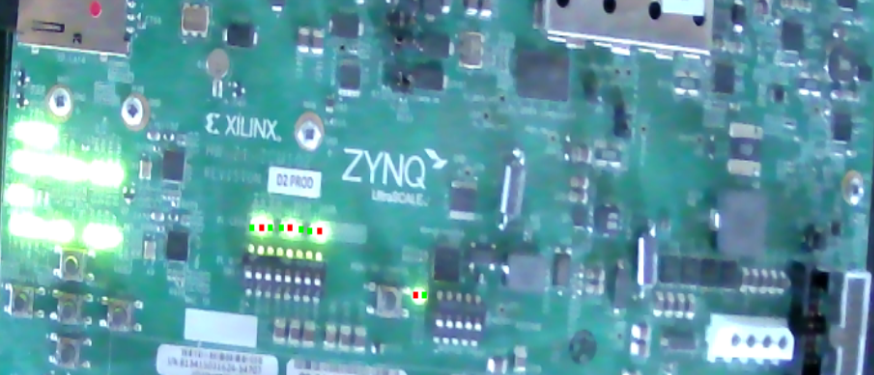
In this picture the light of the LEDs interferes with the neighbour LEDs. It is not clearly visible which LEDs are on and which off, hence the detection is mislead.
If the detection yields wrong results it is necessary to improve the conditions. This can be done in a few ways:
Change the exposure setting of the camera. This is the best solution as it does not require any changes in the general setup. Though most of the cameras do not support this.
Add additional light focused on the board to make the LEDs not as bright in comparison to the rest of the board.
It is also possible to move the camera to only have a part of the board in view making the LEDs more clearly visible. This might impact the detection of the board and therefore has to be tested in practice.
Furthermore, what can be helpful is to decrease the size of the LED ROIs in the BDG. If the ROIs are smaller, interference is not as much likely. Note that this is only effective to a certain degree.
In general, it requires testing to find good conditions.
Homography Pipeline
The homography pipeline provides a homography matrix for estimating the transformation between two images. With this matrix, it is possible to calculate the locations of the led coordinates in the second image with the prior knowledge of the location of the leds in the reference image.
The classes of the BSP
Sequence diagram

The communication between the classes of the BSP and the call hierarchy
State Detector
The main entry point for accessing the BSP. Takes a Board object and the webcam id.
First of all, the stream has to be opened with open_stream(). This is necessary for the tests to be able to pass a mock video capture which works with an already recorded video (see Mock Video Capture for more). Consequently, if the video capture passed is None, the open stream method will open one based on the webcam_id.
Note
The open_stream uses a BufferlessVideoCapture as the State Detector always needs the most recent picture. The processing normally takes longer than the time for new frames to arrive, so effectively frames will be dropped.
The current states will be saved in the state table and are meant to be accessible from the outside. Updates are placed by altering the existing entry in the list and not by creating a new one.
Warning
The order of the state table entries or the content shall not be changed from outside.
On the first detection the homography matrix is calculated and more following detections only check_if_outdated return true, meaning that the matrix is not fresh anymore. If the calculation fails indicated by ROIs with zero size the calculation will be repeated for the next iteration. The same happens when ROIs are overlapping because this indicates that the calculation went wrong as normal LEDs do not overlap.
- class BSP.state_detector.StateDetector(**kwargs)
The State Detector continuously detects the current state of the LEDs, meaning whether they are powered on or off, which color and the frequency.
- on_change(name: str, state: bool, color: str, time_point) None
Function that should be called when a LED state change has been detected.
- Parameters
index – The index of the LED used to assign the table slot.
name – The name of the LED for clear debug outputs.
state – True if this LED is currently powered on.
color – The color that has been detected.
time_point – The time the LED changed it’s state.
- Returns
None.
- open_stream(video_capture: Optional[BSP.BufferlessVideoCapture.BufferlessVideoCapture] = None)
Opens the video stream.
- Parameters
video_capture – If not none, this video capture will be used, otherwise one will be created based on the webcam id. Can be used for tests to pass a mock video capture.
- start()
Starts the detection. Waits the number of seconds configured in the StateDetector, afterwards detects the current state. Repeats itself, blocking.
Board Orientation
The board orientation object is responsible for the information associated with where the board is in a target image. Naturally, if queried with new images this might not be true anymore as the board could have been moved for instance.
For this the object has a timestamp of its creation indicating the time of the calculation, allowing to recalculate the orientation after some time.
The object allows to store the current orientation with the homography matrix, so it is always relative to the image used for the calculation of the homography matrix.
The corners represent the corners of the board, consequently it is assumed that the board is at least rectangular. If the board does not have the required shape, a rectangular selection can be used for the matching as well.
In addition the detection also works if the board is only partly visible.
- class BSP.BoardOrientation.BoardOrientation(homography_matrix, corners, validity_seconds=300)
Contains the orientation of a board. On creation, a timestamp is alongside the homography matrix and the corners stored as well. The validity seconds indicate how long the information this object provides shall be valid.
- check_if_outdated()
Returns whether the information of the object is still valid.
- Returns
True if since the creation time more than validity_seconds elapsed
Led State
- class BSP.led_state.LedState(power, color, timestamp)
Holds information about the power status, color and the time of measurement of a single LED
State Table
- BSP.state_handler.state_table.calculate_frequency(led_id)
Calculates the frequency of the given led_id.
- Parameters
led_id –
- Returns
- BSP.state_handler.state_table.check_if_led_is_new(led_id)
Checks if the given led_id is new.
- Parameters
led_id –
- Returns
- BSP.state_handler.state_table.get_current_state()
Returns the last detected state of all leds.
- Returns
- BSP.state_handler.state_table.get_last_entry(led_id)
Returns the entry.
- Parameters
led_id – is the identifier of the led
state – None if it doesn’t matter, otherwise the state
- Returns
- BSP.state_handler.state_table.get_led_as_time_series(led_id: str)
Returns the time series of the given led_id.
- Parameters
led_id –
- Returns
- BSP.state_handler.state_table.get_led_ids()
Returns the led_ids.
- Returns
- BSP.state_handler.state_table.get_led_time_series(led_id)
Returns the time series of the given led_id.
- Parameters
led_id –
- Returns
- BSP.state_handler.state_table.get_state_table()
Returns an copy of the state table.
- Returns
- BSP.state_handler.state_table.insert_last_time_state(current_entry, last_entry)
Insert the last time entry for the given led_id.
- Parameters
led_id –
state –
- Returns
- BSP.state_handler.state_table.insert_state_entry(led_id: str, state: str, color: str, timestamp=None)
Insert a new row to the state_table
- Parameters
led_id – is the name of the LED type: str
state – the current state. Can be “on” or “off”
color – the color as str
timestamp – the timestamp or None if time.time() should be used.
- Returns
The created entry
- BSP.state_handler.state_table.load_state_table(file_name: str)
Loads the state table from the given file.
- Parameters
file_name –
- Returns
the state table
- BSP.state_handler.state_table.plot_led_time_series(led_id)
Plots the time series of the given led_id.
- Parameters
led_id –
- Returns
State Table Entry
- class BSP.state_table_entry.StateTableEntry(name, current_state: BSP.led_state.LedState, last_time_on, last_time_off)
Represents an entry of the state table. Contains the name, current state, last time on and last time off of an LED. Last time of and off are timestamp based.
Url Board Loader
- BSP.util.UrlBoardLoader.load_board_from_url(config_folder: str, url: str) BDG.model.board_model.Board
Loads a board into the config folder from the given url
- Parameters
config_folder – The folder where the board files should be stored
url – The direct url of the zip board file
- Returns
The loaded Board object
Homography Provider
The homography provider is responsible for providing the board orientation, especially the homography matrix which is inside the BoardOrientation object.
For a detailed and mathematical description of the homography matrix, see Homography Pipeline.
Color Detection
- BSP.LED.ColorDetection.DominantColor.get_dominant_color(img)
This function returns the dominant hue value of an image.
- BSP.LED.ColorDetection.DominantColor.mask_over_expose(img)
This function returns a mask for overexposed values.
- BSP.LED.ColorDetection.DominantColor.plot_hist(img, title: Optional[str] = None)
This function plots the histogram of an image.
- class BSP.LED.ColorDetection.HueComparison.Comparison(colors: [<class 'str'>] = None)
Responsible for the color detection
- color_detection(frame, is_on) str
Helper function using a naive attempt at detecting the LED’s color by comparing the color changes from an off-state and an on-state. The difference in color should be the LED’s color.
- Parameters
frame – A BGR frame of the led.
is_on – True if the LED is on. False if LED is off. None if LED state is unknown.
- Returns
Name of the color or an empty string for no color.
- BSP.LED.ColorDetection.HueComparison.detect_color_from_hist(hist) str
returns the color which changed the most :returns
- BSP.LED.ColorDetection.HueComparison.integral(hist: [<class 'int'>], lower: int, upper: int)
Returns the integral of the given histogram within the given boundaries.
- Parameters
hist – the histogram
lower – the lower boundary
upper – the upper boundary
- Returns
the integral of the given histogram within the given boundaries
- BSP.LED.ColorDetection.KMeans.k_means(img, title: Optional[str] = None)
- Parameters
img – A BGR image.
title – A title for the plot used for debugging.
- Returns
The dominant cluster.
- BSP.LED.ColorDetection.Util.convert_angle_to_vec(angle)
Convert angle (rad) to vector
- BSP.LED.ColorDetection.Util.convert_color_map()
Convert color map
- BSP.LED.ColorDetection.Util.convert_to_rad(hue)
Convert degree to rad. Assume that hue is in range of 0 to 180.
- BSP.LED.ColorDetection.Util.create_new_cmap(colors)
Create new color map
- BSP.LED.ColorDetection.Util.get_closest_color(hue, cmap)
Get closest color
- Parameters
hue – is the hue value range [0,180]
cmap – is a colormap which consist the key as str and the value as rad
- BSP.LED.ColorDetection.Util.plot_color_map(hue=None)
Plot color map
State Detection
- BSP.LED.StateDetection.Brightness.avg_brightness(gray_img) int
Calculates the histogram of the given grayscale image and returns the result of hist_avg().
- Parameters
gray_img – The grayscale image.
- Returns
The average gray level of the given grayscale image.
- BSP.LED.StateDetection.Brightness.cumulative_average(value, n, ca_n)
Calculates the cumulative average (CA) of a given value
- Parameters
value – the value to be added to the CA
n – the current number of values in the CA
ca_n – the current CA value
- Returns
the new CA value
- BSP.LED.StateDetection.Brightness.hist_avg(hist) int
Returns the average in a histogram, returned by cv2.calcHist.
- Parameters
hist – The histogram.
- Returns
The average of the given histogram.
- class BSP.LED.StateDetection.BoardObserver.BoardObserver(board_leds, debug=False)
The Board Observer
- check(frame: numpy.array, rois: List[numpy.array], avg_brightness, on_change) None
Checks if brightness changed substantially in the image. Invalidates the LEDs if necessary and checks all LED states. A LED that changed it’s state will be passed into the on_change function.
- Parameters
frame – the current frame of the camera stream.
rois – all regions of interest for the LEDs in order.
on_change – the function that should be called when a LED has changed it’s state.
avg_brightness –
- Returns
None.
- class BSP.LED.StateDetection.BrightnessComparison.BrightnessComparison(deviation: int = 10)
Detects with the brightness on/off for the LEDs
- detect(img, window_name: Optional[str] = None)
True - LED is powered on. False - LED is powered off. None - LED is in an undefined state.
- Parameters
img – The BGR image of this LED.
window_name – Set a name, to display a cv2 window with the given img in grayscale.
- Returns
True if LED is powered on or None if undefined.
Bufferless Video Capture
- class BSP.BufferlessVideoCapture.BufferlessVideoCapture(name)
A special VideoCapture which will always return the most recent frame instead of the next available, meaning that all frames except the most recent one are dropped. Opens a cv2 VideoCapture with the given name what can be the webcam id to be wrapped.
The resolution is hardcoded but can be changed depending on the camera used. There is no way in Open CV to automatically set the resolution to the maximum. Depending on the camera, more properties can be set here as well.
Mock Video Capture
Can be used for tests. Is of type BufferlessVideoCapture in order to pass the type check but with a flag can be set if is is actually bufferless or rather acts like a normal video capture.
- class MockVideoCapture.MockVideoCapture(name, bufferless)
Mocks a BufferlessVideoCapture but does not necessarily be buferless. This allows to pass the type assertions in the state detector while giving the opportunity to return own images instead of a video.
Led Extractor
Responsible for extracting the ROIs of the LEDs by the given LED objects and the board orientation. In addition it fills the squares except the circles of the LEDs with gray color.
Returns a list of numpy arrays, the ROIs of the LEDs in the same order as in the LED object list.
- BSP.led_extractor.get_led_roi(frame: numpy.array, leds: List[BDG.model.board_model.Led], board_orientation: BSP.BoardOrientation.BoardOrientation) List[numpy.array]
Returns the LEDs in the target image based on the homography matrix
- Parameters
leds – A list with the LED objects which shall be evaluated
frame – The frame where the LEDs will be cut out
board_orientation – The orientation of the board in a BoardOrientation object
- Returns
The LEDs in the target image as a list
- BSP.led_extractor.get_transformed_borders(leds: List[BDG.model.board_model.Led], board_orientation: BSP.BoardOrientation.BoardOrientation) List[numpy.array]
Transforms the ROIs with the given board orientation :param leds: The list with the position of the LEDs :param board_orientation: The orientation of the board :return: A list with the upper left and lower right corner coordinates of the leds in the coordinate system of the
transformed board
Test coverage
The BSP has a blackbox test which runs a detection of LEDs on a Raspberry Pi. The other modules have unit tests as far as possible. There are no UI tests for the BDG as the unit tests already cover the logic.
Example
Following example starts the StateDetector with a video stream on /dev/video1. The detection is run in another thread.
# Load json reference from file
reference = jsutil.from_json(file_path=reference-file-path)
# Create new State Detector instance with webcam on /dev/video1
with StateDetector(reference=reference, webcam_id=1) as dec:
    # Open video stream
    dec.open_stream()
    # Start detection in other thread
    th = threading.Thread(target=dec.start)
    th.start()

    # Avoid closing main thread
    th.join()